Explore Liquor licensed premises, New South Wales
Charts and tables over the 19,233 rows of the latest version, worked out in your browser from the Parquet file. Nothing you do here leaves the browser until you save a link.
Version
2024-06-18 (latest) Add a chart
Copy link
Save a short link
Embed
Start again
The explorer needs JavaScript and a browser from the last few years. The dataset page has every file and the query API.
Press Edit on any panel to change its chart type and drag fields into Group by, Split by and Filter. Drag a panel by its title to move or dock it, and click a bar in the first chart to filter the rest.
Licences on the list by the year they started per year
0 200 400 600 800 1k 1906 Liquor - club licence: 1 1906 Liquor - hotel licence: 1 1910 Liquor - hotel licence: 1 1911 Liquor - club licence: 1 1920 Liquor - hotel licence: 5 1922 Liquor - on-premises licence: 1 1922 Liquor - packaged liquor licence: 2 1923 Liquor - on-premises licence: 10 1923 Liquor - packaged liquor licence: 86 1924 Liquor - hotel licence: 1 1924 Liquor - packaged liquor licence: 1 1925 Liquor - hotel licence: 3 1925 Liquor - packaged liquor licence: 1 1925 1926 Liquor - hotel licence: 1 1926 Liquor - packaged liquor licence: 2 1927 Liquor - hotel licence: 2 1928 Liquor - packaged liquor licence: 2 1929 Liquor - hotel licence: 3 1929 Liquor - packaged liquor licence: 1 1930 Liquor - club licence: 2 1930 Liquor - hotel licence: 5 1930 Liquor - packaged liquor licence: 4 1931 Liquor - hotel licence: 2 1931 Liquor - packaged liquor licence: 2 1932 Liquor - hotel licence: 5 1933 Liquor - hotel licence: 4 1934 Liquor - hotel licence: 4 1934 Liquor - packaged liquor licence: 4 1935 Liquor - hotel licence: 5 1935 Liquor - packaged liquor licence: 1 1936 Liquor - hotel licence: 4 1936 Liquor - packaged liquor licence: 1 1937 Liquor - hotel licence: 6 1938 Liquor - hotel licence: 6 1938 Liquor - packaged liquor licence: 3 1939 Liquor - hotel licence: 8 1939 Liquor - packaged liquor licence: 3 1939 1940 Liquor - hotel licence: 13 1940 Liquor - packaged liquor licence: 1 1941 Liquor - hotel licence: 4 1941 Liquor - packaged liquor licence: 1 1942 Liquor - hotel licence: 9 1942 Liquor - packaged liquor licence: 2 1943 Liquor - club licence: 1 1943 Liquor - hotel licence: 7 1943 Liquor - packaged liquor licence: 3 1944 Liquor - club licence: 1 1944 Liquor - hotel licence: 8 1945 Liquor - hotel licence: 11 1945 Liquor - packaged liquor licence: 2 1946 Liquor - club licence: 3 1946 Liquor - hotel licence: 11 1946 Liquor - packaged liquor licence: 28 1947 Liquor - club licence: 142 1947 Liquor - hotel licence: 26 1947 Liquor - packaged liquor licence: 34 1948 Liquor - club licence: 75 1948 Liquor - hotel licence: 26 1948 Liquor - packaged liquor licence: 14 1949 Liquor - club licence: 15 1949 Liquor - hotel licence: 25 1949 Liquor - packaged liquor licence: 5 1950 Liquor - club licence: 13 1950 Liquor - hotel licence: 27 1950 Liquor - on-premises licence: 8 1950 Liquor - packaged liquor licence: 24 1951 Liquor - club licence: 9 1951 Liquor - hotel licence: 28 1951 Liquor - packaged liquor licence: 15 1952 Liquor - club licence: 4 1952 Liquor - hotel licence: 39 1952 Liquor - packaged liquor licence: 19 1953 Liquor - club licence: 4 1953 Liquor - hotel licence: 56 1953 Liquor - packaged liquor licence: 18 1953 1954 Liquor - club licence: 7 1954 Liquor - hotel licence: 81 1954 Liquor - on-premises licence: 1 1954 Liquor - packaged liquor licence: 19 1955 Liquor - club licence: 267 1955 Liquor - hotel licence: 89 1955 Liquor - on-premises licence: 4 1955 Liquor - packaged liquor licence: 12 1956 Liquor - club licence: 98 1956 Liquor - hotel licence: 126 1956 Liquor - on-premises licence: 2 1956 Liquor - packaged liquor licence: 14 1957 Liquor - club licence: 89 1957 Liquor - hotel licence: 141 1957 Liquor - on-premises licence: 1 1957 Liquor - packaged liquor licence: 20 1957 Liquor - producer wholesaler licence: 1 1958 Liquor - club licence: 51 1958 Liquor - hotel licence: 215 1958 Liquor - on-premises licence: 3 1958 Liquor - packaged liquor licence: 28 1959 Liquor - club licence: 35 1959 Liquor - hotel licence: 324 1959 Liquor - on-premises licence: 4 1959 Liquor - packaged liquor licence: 34 1960 Liquor - club licence: 37 1960 Liquor - hotel licence: 291 1960 Liquor - on-premises licence: 4 1960 Liquor - packaged liquor licence: 21 1960 Liquor - producer wholesaler licence: 2 1961 Liquor - club licence: 24 1961 Liquor - hotel licence: 65 1961 Liquor - on-premises licence: 5 1961 Liquor - packaged liquor licence: 21 1962 Liquor - club licence: 21 1962 Liquor - hotel licence: 60 1962 Liquor - on-premises licence: 4 1962 Liquor - packaged liquor licence: 8 1963 Liquor - club licence: 23 1963 Liquor - hotel licence: 2 1963 Liquor - on-premises licence: 7 1963 Liquor - packaged liquor licence: 6 1964 Liquor - club licence: 22 1964 Liquor - hotel licence: 3 1964 Liquor - on-premises licence: 3 1964 Liquor - packaged liquor licence: 2 1965 Liquor - club licence: 12 1965 Liquor - hotel licence: 2 1965 Liquor - on-premises licence: 6 1965 Liquor - packaged liquor licence: 11 1966 Liquor - club licence: 14 1966 Liquor - hotel licence: 4 1966 Liquor - on-premises licence: 7 1966 Liquor - packaged liquor licence: 14 1967 Liquor - club licence: 20 1967 Liquor - hotel licence: 4 1967 Liquor - on-premises licence: 8 1967 Liquor - packaged liquor licence: 27 1967 1968 Liquor - club licence: 8 1968 Liquor - hotel licence: 4 1968 Liquor - on-premises licence: 8 1968 Liquor - packaged liquor licence: 24 1969 Liquor - club licence: 4 1969 Liquor - hotel licence: 1 1969 Liquor - on-premises licence: 17 1969 Liquor - packaged liquor licence: 51 1970 Liquor - club licence: 6 1970 Liquor - hotel licence: 3 1970 Liquor - on-premises licence: 17 1970 Liquor - packaged liquor licence: 31 1971 Liquor - club licence: 6 1971 Liquor - hotel licence: 3 1971 Liquor - on-premises licence: 14 1971 Liquor - packaged liquor licence: 25 1972 Liquor - club licence: 14 1972 Liquor - hotel licence: 5 1972 Liquor - on-premises licence: 23 1972 Liquor - packaged liquor licence: 29 1973 Liquor - club licence: 10 1973 Liquor - hotel licence: 6 1973 Liquor - on-premises licence: 41 1973 Liquor - packaged liquor licence: 42 1974 Liquor - club licence: 16 1974 Liquor - hotel licence: 3 1974 Liquor - on-premises licence: 32 1974 Liquor - packaged liquor licence: 39 1975 Liquor - club licence: 7 1975 Liquor - hotel licence: 1 1975 Liquor - on-premises licence: 31 1975 Liquor - packaged liquor licence: 62 1975 Liquor - producer wholesaler licence: 3 1976 Liquor - club licence: 2 1976 Liquor - hotel licence: 2 1976 Liquor - on-premises licence: 41 1976 Liquor - packaged liquor licence: 50 1977 Liquor - club licence: 10 1977 Liquor - on-premises licence: 36 1977 Liquor - packaged liquor licence: 55 1978 Liquor - club licence: 6 1978 Liquor - hotel licence: 5 1978 Liquor - on-premises licence: 38 1978 Liquor - packaged liquor licence: 30 1979 Liquor - club licence: 13 1979 Liquor - hotel licence: 5 1979 Liquor - limited licence: 3 1979 Liquor - on-premises licence: 55 1979 Liquor - packaged liquor licence: 52 1980 Liquor - club licence: 7 1980 Liquor - hotel licence: 2 1980 Liquor - limited licence: 117 1980 Liquor - on-premises licence: 49 1980 Liquor - packaged liquor licence: 44 1980 Liquor - producer wholesaler licence: 1 1981 Liquor - club licence: 3 1981 Liquor - hotel licence: 5 1981 Liquor - limited licence: 18 1981 Liquor - on-premises licence: 54 1981 Liquor - packaged liquor licence: 29 1981 Liquor - producer wholesaler licence: 1 1981 1982 Liquor - club licence: 11 1982 Liquor - hotel licence: 10 1982 Liquor - limited licence: 10 1982 Liquor - on-premises licence: 64 1982 Liquor - packaged liquor licence: 30 1982 Liquor - producer wholesaler licence: 1 1983 Liquor - club licence: 11 1983 Liquor - hotel licence: 2 1983 Liquor - limited licence: 10 1983 Liquor - on-premises licence: 50 1983 Liquor - packaged liquor licence: 26 1983 Liquor - producer wholesaler licence: 50 1984 Liquor - club licence: 10 1984 Liquor - hotel licence: 1 1984 Liquor - limited licence: 23 1984 Liquor - on-premises licence: 58 1984 Liquor - packaged liquor licence: 23 1984 Liquor - producer wholesaler licence: 35 1985 Liquor - club licence: 7 1985 Liquor - hotel licence: 1 1985 Liquor - limited licence: 11 1985 Liquor - on-premises licence: 55 1985 Liquor - packaged liquor licence: 14 1985 Liquor - producer wholesaler licence: 8 1986 Liquor - club licence: 3 1986 Liquor - hotel licence: 3 1986 Liquor - limited licence: 12 1986 Liquor - on-premises licence: 65 1986 Liquor - packaged liquor licence: 22 1986 Liquor - producer wholesaler licence: 9 1987 Liquor - club licence: 2 1987 Liquor - hotel licence: 4 1987 Liquor - limited licence: 12 1987 Liquor - on-premises licence: 67 1987 Liquor - packaged liquor licence: 14 1987 Liquor - producer wholesaler licence: 8 1988 Liquor - club licence: 8 1988 Liquor - hotel licence: 3 1988 Liquor - limited licence: 26 1988 Liquor - on-premises licence: 81 1988 Liquor - packaged liquor licence: 14 1988 Liquor - producer wholesaler licence: 9 1989 Liquor - club licence: 7 1989 Liquor - hotel licence: 4 1989 Liquor - limited licence: 24 1989 Liquor - on-premises licence: 80 1989 Liquor - packaged liquor licence: 9 1989 Liquor - producer wholesaler licence: 9 1990 Liquor - club licence: 7 1990 Liquor - hotel licence: 3 1990 Liquor - limited licence: 18 1990 Liquor - on-premises licence: 66 1990 Liquor - packaged liquor licence: 12 1990 Liquor - producer wholesaler licence: 12 1991 Liquor - club licence: 3 1991 Liquor - hotel licence: 6 1991 Liquor - limited licence: 18 1991 Liquor - on-premises licence: 66 1991 Liquor - packaged liquor licence: 6 1991 Liquor - producer wholesaler licence: 5 1992 Liquor - club licence: 2 1992 Liquor - hotel licence: 3 1992 Liquor - limited licence: 14 1992 Liquor - on-premises licence: 61 1992 Liquor - packaged liquor licence: 6 1992 Liquor - producer wholesaler licence: 6 1993 Liquor - club licence: 6 1993 Liquor - hotel licence: 3 1993 Liquor - limited licence: 14 1993 Liquor - on-premises licence: 67 1993 Liquor - packaged liquor licence: 10 1993 Liquor - producer wholesaler licence: 7 1994 Liquor - club licence: 5 1994 Liquor - hotel licence: 2 1994 Liquor - limited licence: 12 1994 Liquor - on-premises licence: 74 1994 Liquor - packaged liquor licence: 9 1994 Liquor - producer wholesaler licence: 14 1995 Liquor - club licence: 5 1995 Liquor - limited licence: 11 1995 Liquor - on-premises licence: 81 1995 Liquor - packaged liquor licence: 9 1995 Liquor - producer wholesaler licence: 9 1995 1996 Liquor - club licence: 4 1996 Liquor - hotel licence: 2 1996 Liquor - limited licence: 10 1996 Liquor - on-premises licence: 82 1996 Liquor - packaged liquor licence: 12 1996 Liquor - producer wholesaler licence: 20 1997 Liquor - club licence: 20 1997 Liquor - hotel licence: 5 1997 Liquor - limited licence: 17 1997 Liquor - on-premises licence: 98 1997 Liquor - packaged liquor licence: 9 1997 Liquor - producer wholesaler licence: 17 1998 Liquor - club licence: 11 1998 Liquor - hotel licence: 1 1998 Liquor - limited licence: 26 1998 Liquor - on-premises licence: 131 1998 Liquor - packaged liquor licence: 10 1998 Liquor - producer wholesaler licence: 23 1999 Liquor - club licence: 2 1999 Liquor - hotel licence: 9 1999 Liquor - limited licence: 26 1999 Liquor - on-premises licence: 136 1999 Liquor - packaged liquor licence: 13 1999 Liquor - producer wholesaler licence: 33 2000 Liquor - club licence: 3 2000 Liquor - hotel licence: 8 2000 Liquor - limited licence: 25 2000 Liquor - on-premises licence: 176 2000 Liquor - packaged liquor licence: 16 2000 Liquor - producer wholesaler licence: 31 2001 Liquor - club licence: 1 2001 Liquor - hotel licence: 2 2001 Liquor - limited licence: 14 2001 Liquor - on-premises licence: 117 2001 Liquor - packaged liquor licence: 14 2001 Liquor - producer wholesaler licence: 36 2002 Liquor - club licence: 3 2002 Liquor - hotel licence: 7 2002 Liquor - limited licence: 33 2002 Liquor - on-premises licence: 124 2002 Liquor - packaged liquor licence: 19 2002 Liquor - producer wholesaler licence: 48 2003 Liquor - hotel licence: 3 2003 Liquor - limited licence: 47 2003 Liquor - on-premises licence: 115 2003 Liquor - packaged liquor licence: 11 2003 Liquor - producer wholesaler licence: 53 2004 Liquor - club licence: 2 2004 Liquor - hotel licence: 4 2004 Liquor - limited licence: 29 2004 Liquor - on-premises licence: 163 2004 Liquor - packaged liquor licence: 29 2004 Liquor - producer wholesaler licence: 38 2005 Liquor - club licence: 2 2005 Liquor - hotel licence: 3 2005 Liquor - limited licence: 37 2005 Liquor - on-premises licence: 162 2005 Liquor - packaged liquor licence: 20 2005 Liquor - producer wholesaler licence: 40 2006 Liquor - hotel licence: 3 2006 Liquor - limited licence: 27 2006 Liquor - on-premises licence: 156 2006 Liquor - packaged liquor licence: 5 2006 Liquor - producer wholesaler licence: 46 2007 Liquor - club licence: 2 2007 Liquor - hotel licence: 5 2007 Liquor - limited licence: 25 2007 Liquor - on-premises licence: 177 2007 Liquor - packaged liquor licence: 21 2007 Liquor - producer wholesaler licence: 39 2008 Liquor - club licence: 2 2008 Liquor - hotel licence: 8 2008 Liquor - limited licence: 31 2008 Liquor - on-premises licence: 171 2008 Liquor - packaged liquor licence: 23 2008 Liquor - producer wholesaler licence: 48 2009 Liquor - hotel licence: 14 2009 Liquor - limited licence: 38 2009 Liquor - on-premises licence: 255 2009 Liquor - packaged liquor licence: 78 2009 Liquor - producer wholesaler licence: 57 2009 2010 Liquor - club licence: 2 2010 Liquor - hotel licence: 22 2010 Liquor - limited licence: 24 2010 Liquor - on-premises licence: 282 2010 Liquor - packaged liquor licence: 86 2010 Liquor - producer wholesaler licence: 44 2011 Liquor - hotel licence: 18 2011 Liquor - limited licence: 24 2011 Liquor - on-premises licence: 269 2011 Liquor - packaged liquor licence: 110 2011 Liquor - producer wholesaler licence: 43 2012 Liquor - hotel licence: 15 2012 Liquor - limited licence: 19 2012 Liquor - on-premises licence: 258 2012 Liquor - packaged liquor licence: 123 2012 Liquor - producer wholesaler licence: 53 2013 Liquor - club licence: 2 2013 Liquor - hotel licence: 17 2013 Liquor - limited licence: 17 2013 Liquor - on-premises licence: 297 2013 Liquor - packaged liquor licence: 93 2013 Liquor - producer wholesaler licence: 48 2013 Liquor - small bar licence: 5 2014 Liquor - hotel licence: 7 2014 Liquor - limited licence: 38 2014 Liquor - on-premises licence: 262 2014 Liquor - packaged liquor licence: 55 2014 Liquor - producer wholesaler licence: 37 2014 Liquor - small bar licence: 11 2015 Liquor - hotel licence: 9 2015 Liquor - limited licence: 26 2015 Liquor - on-premises licence: 357 2015 Liquor - packaged liquor licence: 80 2015 Liquor - producer wholesaler licence: 70 2015 Liquor - small bar licence: 19 2016 Liquor - club licence: 1 2016 Liquor - hotel licence: 9 2016 Liquor - limited licence: 28 2016 Liquor - on-premises licence: 399 2016 Liquor - packaged liquor licence: 67 2016 Liquor - producer wholesaler licence: 55 2016 Liquor - small bar licence: 4 2017 Liquor - club licence: 3 2017 Liquor - hotel licence: 8 2017 Liquor - limited licence: 31 2017 Liquor - on-premises licence: 501 2017 Liquor - packaged liquor licence: 71 2017 Liquor - producer wholesaler licence: 85 2017 Liquor - small bar licence: 32 2018 Liquor - club licence: 1 2018 Liquor - hotel licence: 16 2018 Liquor - limited licence: 42 2018 Liquor - on-premises licence: 459 2018 Liquor - packaged liquor licence: 89 2018 Liquor - producer wholesaler licence: 80 2018 Liquor - small bar licence: 30 2019 Liquor - club licence: 2 2019 Liquor - hotel licence: 6 2019 Liquor - limited licence: 63 2019 Liquor - on-premises licence: 380 2019 Liquor - packaged liquor licence: 90 2019 Liquor - producer wholesaler licence: 82 2019 Liquor - small bar licence: 19 2020 Liquor - club licence: 1 2020 Liquor - hotel licence: 15 2020 Liquor - limited licence: 20 2020 Liquor - on-premises licence: 464 2020 Liquor - packaged liquor licence: 176 2020 Liquor - producer wholesaler licence: 106 2020 Liquor - small bar licence: 22 2021 Liquor - club licence: 2 2021 Liquor - hotel licence: 15 2021 Liquor - limited licence: 38 2021 Liquor - on-premises licence: 522 2021 Liquor - packaged liquor licence: 223 2021 Liquor - producer wholesaler licence: 96 2021 Liquor - small bar licence: 42 2022 Liquor - club licence: 1 2022 Liquor - hotel licence: 10 2022 Liquor - limited licence: 45 2022 Liquor - on-premises licence: 570 2022 Liquor - packaged liquor licence: 158 2022 Liquor - producer wholesaler licence: 119 2022 Liquor - small bar licence: 25 2023 Liquor - club licence: 1 2023 Liquor - hotel licence: 15 2023 Liquor - limited licence: 62 2023 Liquor - on-premises licence: 564 2023 Liquor - packaged liquor licence: 147 2023 Liquor - producer wholesaler licence: 123 2023 Liquor - small bar licence: 44 2023
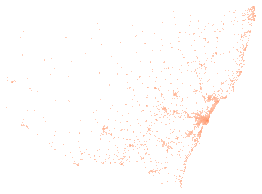
Map
Sydney Canberra Newcastle
Data: Liquor and Gaming NSW, NSW Government, Liquor licence premises list, sourced 3 October 2026, https://data.nsw.gov.au/data/dataset/liquor-licence-premises-list, licensed under CC BY 4.0. Licence terms .
How it works
Change a panel Press Edit at the top right of a panel to open its settings. Drag fields into Group by, Split by, Sort by and Filter, pick a chart type at the top, and choose sum, count or average beside each number. More fields lists everything else in the dataset. The chart types include bars, lines, areas, scatter plots, heatmaps, treemaps and sunbursts, and maps of the coordinates. Add a chart puts a new panel on the dashboard. Drag a panel's title bar to move it, or drag the line between panels to resize.
Filter every panel at once The chart marked Click to filter the others does just that: click a bar and the other panels show only those rows. Click it again to clear. Any panel can do the same. Open the menu at the left of its title bar and turn on filtering from there.
Share or keep a dashboard The address bar holds the whole dashboard, so copying it is enough. Save a short link to store the dashboard on this site and get a shorter address. A saved dashboard never changes; saving again after an edit makes a new link. Embed gives a frame you can paste into a web page, with the attribution inside it.
Download what you see The export button in a panel's settings toolbar downloads the panel as CSV, JSON or Arrow, or a chart as PNG. The copy button beside it puts the same data on the clipboard. The full files are on the dataset page .
What the fields mean
The explorer names each field in words. The files and the query API use the field name beside it.
In the explorer Field name Type Note
Licence number licence_number string Licence type licence_type string Start date start_date datetime Status status string Status date status_date datetime Trading status trading_status string Licence name licence_name string Address address string Suburb suburb string Postcode postcode string Latitude latitude number As published. The publisher does not state the datum. Longitude longitude number As published. The publisher does not state the datum. Council area lga string Precinct precinct string Region region string Licensee type licensee_type string Licensee ABN licensee_abn string Licensee ACN licensee_acn string Business type business_type string Authorisation restriction name authorisation_restriction_name string Extended trading extended_trading boolean Reduced trading reduced_trading boolean Primary service primary_service boolean Right to keep gaming right_to_keep_gaming boolean Unrestricted unrestricted boolean Trading to midnight to_12am boolean Trading to 3am to_3am boolean Trading to 5am to_5am boolean SA2 sa2 string SA2 band band integer Gaming machine entitlements gmes integer Poker machine permits pmps integer Auth limit auth_limit integer Unfulfilled quota unfulfilled_quota integer Gaming machine threshold gmt integer Operating gaming machines egms integer
How it runs The page downloads DuckDB and Perspective once, about 17 MB, then this version's data.parquet (1.2 MB). Every chart is a query DuckDB answers in the browser, so there is no rate limit and the files stay the only source. Dated versions never change, so a saved dashboard over one shows the same numbers for good. A map panel draws its background from OpenStreetMap tiles, so while one is on screen your browser asks OpenStreetMap for them and it sees your IP address. The data itself never leaves the browser.